

Showing posts with label Decorative Object. Show all posts
Showing posts with label Decorative Object. Show all posts
Friday, May 3, 2013
Chopsticks object & accessories for poses
I have made those chopsticks because I needed them for my story. There are
poses related to them and you can find them here.


Tea cups empty, full & tilted for poses

Wednesday, March 27, 2013
EA Register from EP University made BG compatible
For some reason the original one is not working for me as a register in game. Either I have a conflicting mod or they just made it decorative. After all, in the second EP there was already the cash register that came with Supernatural, it was decorative only.
So here it comes, for story tellers or people who do not own University and would like to use a cash register for their store.

So here it comes, for story tellers or people who do not own University and would like to use a cash register for their store.

Thursday, March 21, 2013
ATS3 Registers made deco BG compatible
For starters don't get me wrong, when I play my game I do visit the stores and buy stuff, especially when I go on vacations (World Adventure). But when it comes to working on my story and seeing the game change the clerks in my studio like 3 times already, plus the fact that you cannot make them pose, not even with the Pose Player Addon, I say clerk be gone!

EA Registers made deco BG compatible
I made this for story writers and people who do not own either World
Adventure, Ambition or Supernatural and would like to use decorative
cash registers when they build a shop.
For starters don't get me wrong, when I play my game I do visit the stores and buy stuff, especially when I go on vacations (World Adventure). But when it comes to working on my story and seeing the game change the clerks in my studio like 3 times already, plus the fact that you cannot make them pose, not even with the Pose Player Addon, I say punk clerk be gone!

For starters don't get me wrong, when I play my game I do visit the stores and buy stuff, especially when I go on vacations (World Adventure). But when it comes to working on my story and seeing the game change the clerks in my studio like 3 times already, plus the fact that you cannot make them pose, not even with the Pose Player Addon, I say punk clerk be gone!

Thursday, October 4, 2012
200 Facebook Likes Celebration Gift
Yesterday my facebook page reached 200 likes, which I am grateful for. To celebrate while staying in the Vocaloid spirit, here is a little something I hope you will like~


Wednesday, October 3, 2012
Portable keyboard
This is the Prudence Pennypincher's Portable Piano from Late Night edition after a bit of modification. I removed the seat to use for poses with a standing sim, and I made it base game compatible.


Saturday, May 5, 2012
Japanese Paintings Set

So I finally did it, those are the three Japanese paintings I had done for the Sims 1!
I made them for the Art Gallery, so you can chose to have them at home, but keep in mind that they are quite big. It still looks really nice though, at least it is my opinion. Custom mesh made by myself for each paintings.


Sunday, November 20, 2011
Posters Mariage Frères
I had done those about a month ago, but for some reason I couldn't upload them as a set on TSR so I gave up for a while. I was thinking I should upload them on MTS but their policies on accepting paintings is quite strict for a beginner...
So here they are, if someone wants them! Those are old posters for a french company still very famous for making tea.

So here they are, if someone wants them! Those are old posters for a french company still very famous for making tea.

Thursday, November 17, 2011
Legend of Zelda Tryptic
Who hasn't spent countless hours playing Zelda?
This tryptic represents Princess Zelda, the Triforce and Link.

This tryptic represents Princess Zelda, the Triforce and Link.

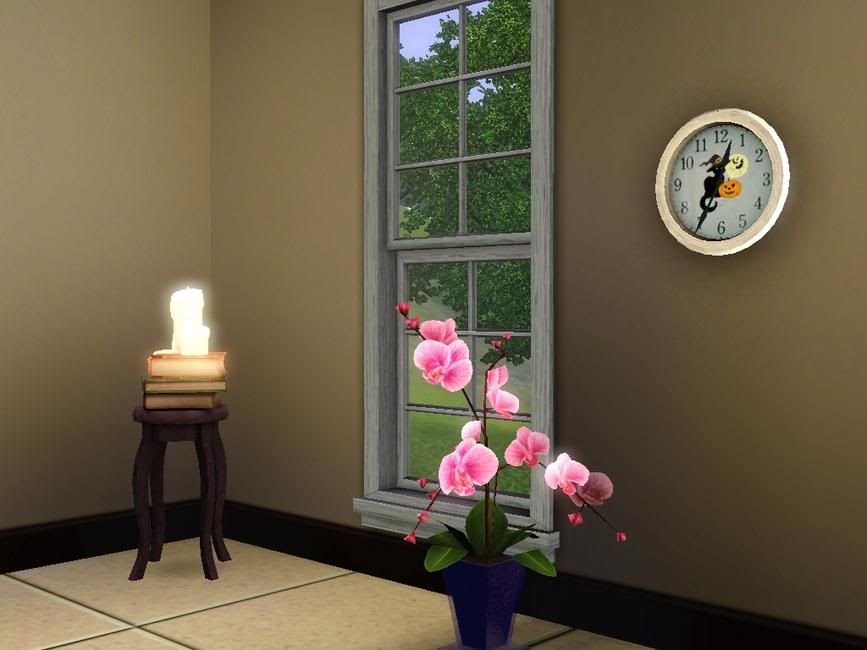
Halloween Clock
Can you tell I like Halloween?
Decorate your house with this cute clock that will remind you it's Halloween!
It has the same design I used for the toddler's shirt before of a cat standing next to a pumpkin with the moon and bats behind.

Decorate your house with this cute clock that will remind you it's Halloween!
It has the same design I used for the toddler's shirt before of a cat standing next to a pumpkin with the moon and bats behind.
Carcassonne Painting
Carcassonne is one of the last fortified cities from Middle Ages to be still intact.
South of France, the castle is still standing proud above the new town, and in summer you used to be able to attend medieval spectacles. Now it's mostly music shows. I grew up here, and it's where my heart lies...

South of France, the castle is still standing proud above the new town, and in summer you used to be able to attend medieval spectacles. Now it's mostly music shows. I grew up here, and it's where my heart lies...

Halloween Painting
This year again, people have been 'trick or treating' for Halloween!
This nice painting will remind you of the event for the time to come, plus it looks like a lovely decoration! Keep the spirit of Halloween alive!

This nice painting will remind you of the event for the time to come, plus it looks like a lovely decoration! Keep the spirit of Halloween alive!
Subscribe to:
Posts (Atom)

