

Showing posts with label Male. Show all posts
Showing posts with label Male. Show all posts
Monday, March 11, 2013
Templar Cross Tattoo - requested
Now this is a very simple tattoo, with only one area recolor, but I made it for my friend Clarisse as she needed it for her story. She asked me to upload it, in case anyone else would have a need for it as well, so here it is. I had some fun taking this picture! Don't mind me :p


Wednesday, November 7, 2012
The Kawai T-shirt - Unisex
I have been requested by Elec-1 on TSR to make the boy's version also available for girls. Since last year when I made those shirts I learned that both toddlers and children meshes can be used for both male and female, so I decided to make both version unisex.


Monday, October 15, 2012
Terwa shirt for male adults
I never have any trouble to find clothes for my girls, but my boys...
Those shirts are base game compatible, even though they come from an EP.
Designs: Run zombies are coming!, Fallout 3 & dragon

Those shirts are base game compatible, even though they come from an EP.
Designs: Run zombies are coming!, Fallout 3 & dragon

Nude 'clothing'
I know it has been done before, I saw it once for download on another blogspot, but when I followed the link it sent me on a forum where I had to register which I find really frustrating.
So until now I have been using Cmar outfit changing script to get my sims naked if I needed it.
But if you edit in CAS a sim that was created by the game (either a townie or children born in the family), the naked state use their original haircut, which is bad enough when they take a shower/bath. Also some creators keep checking all possible things I guess, making their clothes for every categories, including naked. One of my sim got stuck with lingerie when she is naked...
Going through clothes in TSR Workshop I realized that all the nude parts are here, just not enabled for everyday use. Men can have a nude top for athletic, swimwear and sleepwear, and everyone can go barefeet for swimwear and sleepwear.

So until now I have been using Cmar outfit changing script to get my sims naked if I needed it.
But if you edit in CAS a sim that was created by the game (either a townie or children born in the family), the naked state use their original haircut, which is bad enough when they take a shower/bath. Also some creators keep checking all possible things I guess, making their clothes for every categories, including naked. One of my sim got stuck with lingerie when she is naked...
Going through clothes in TSR Workshop I realized that all the nude parts are here, just not enabled for everyday use. Men can have a nude top for athletic, swimwear and sleepwear, and everyone can go barefeet for swimwear and sleepwear.

Tuesday, December 6, 2011
Tribal Dragon Tattoo
I have been so busy lately trying to improve that I felt the need to make something more simple. It still took me a while until I figured out what was wrong, and the next time I will try for a more complex tattoo. Still I really like how it turned out!
This is a one chanel tattoo with the tribal design of a dragon, available for both male and female.
Because the design is a bit complex, the normal size will be a bit blurry depending where you want to use it. Open the Advanced Mode and raise the scale (scale and opacity are on max on the preview picture).

This is a one chanel tattoo with the tribal design of a dragon, available for both male and female.
Because the design is a bit complex, the normal size will be a bit blurry depending where you want to use it. Open the Advanced Mode and raise the scale (scale and opacity are on max on the preview picture).
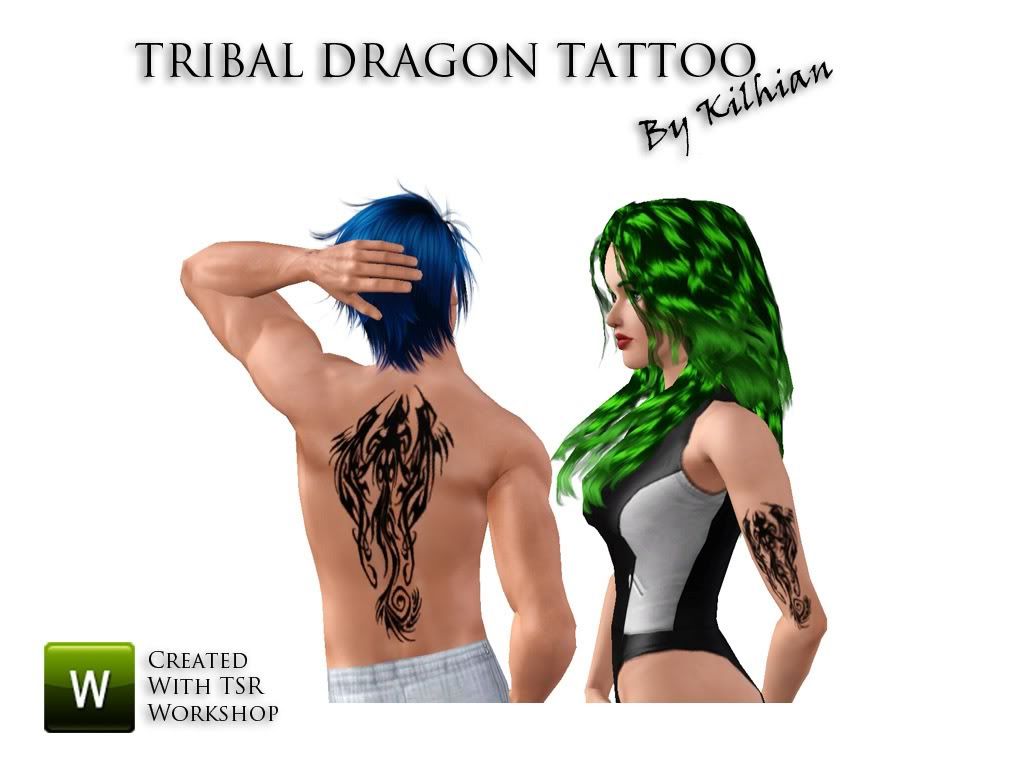
Thursday, November 17, 2011
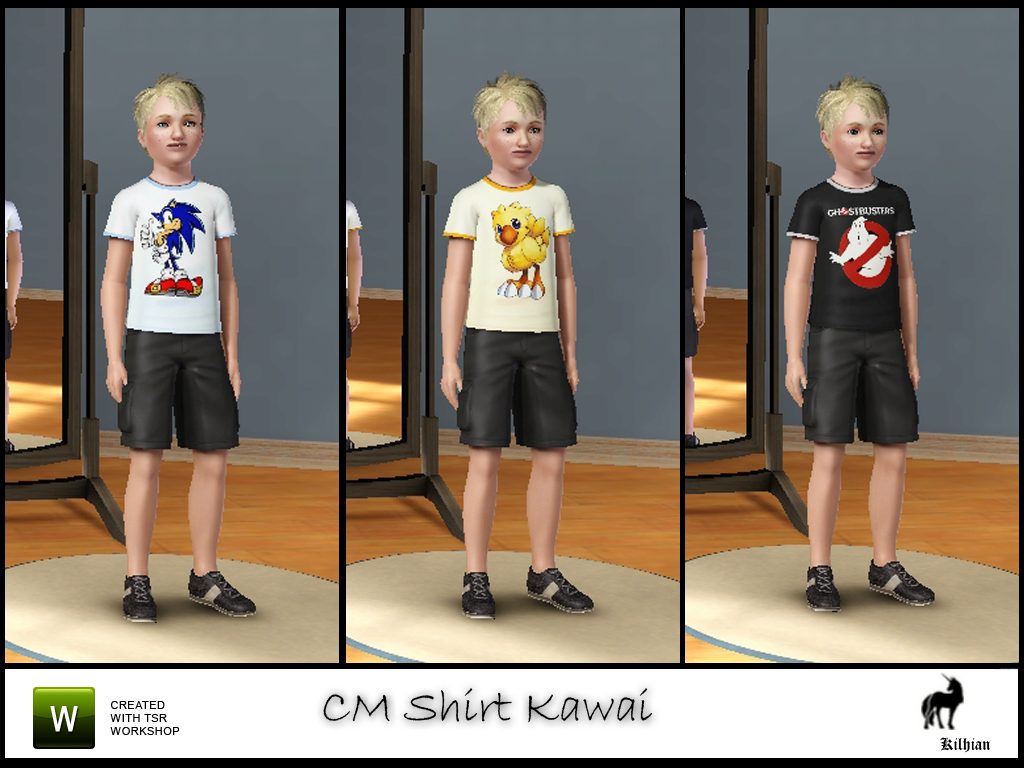
The Kawai T-shirt - Male version-
Get one of those nice shirt for your child with either Sonic, a Chocobo or the Ghostbusters! Those little demons will look even more adorable~
I used stencils, but there are two areas recolorable: the shirt itself and the borders.

I used stencils, but there are two areas recolorable: the shirt itself and the borders.
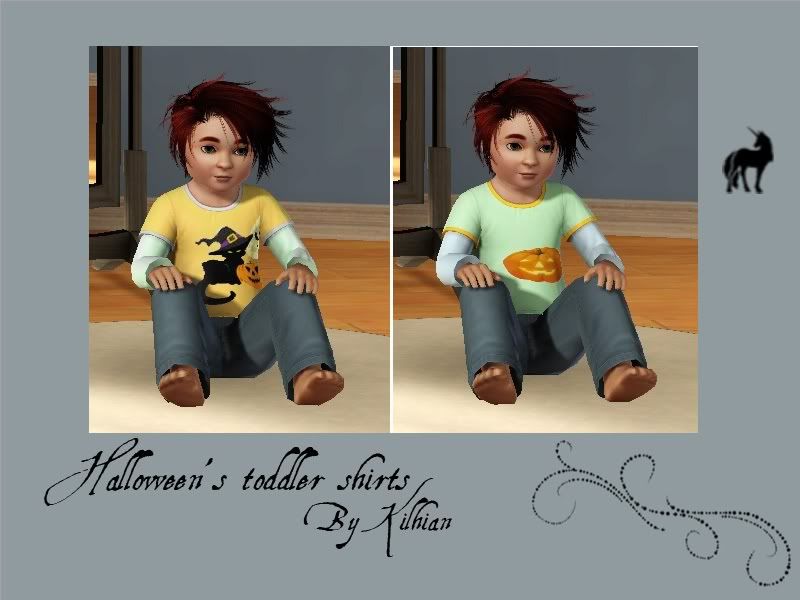
Halloween toddler's T-shirt
Toddlers might be too small to go trick or treating with their siblings, but it doesn't stop them from looking cute! Two adorable T-shirts for your kids to put on.
I used stencils, but there are two areas recolorable: the shirt itself and the borders.
One has a black cat standing next to a pumpkin with the moon and bats behind, the other has a simple pumpkin.

I used stencils, but there are two areas recolorable: the shirt itself and the borders.
One has a black cat standing next to a pumpkin with the moon and bats behind, the other has a simple pumpkin.
Subscribe to:
Posts (Atom)

