Now this is a very simple tattoo, with only one area recolor, but I made it for my friend Clarisse as she needed it for her story. She asked me to upload it, in case anyone else would have a need for it as well, so here it is. I had some fun taking this picture! Don't mind me :p
Showing posts with label Tattoo. Show all posts
Monday, March 11, 2013
Tuesday, December 6, 2011
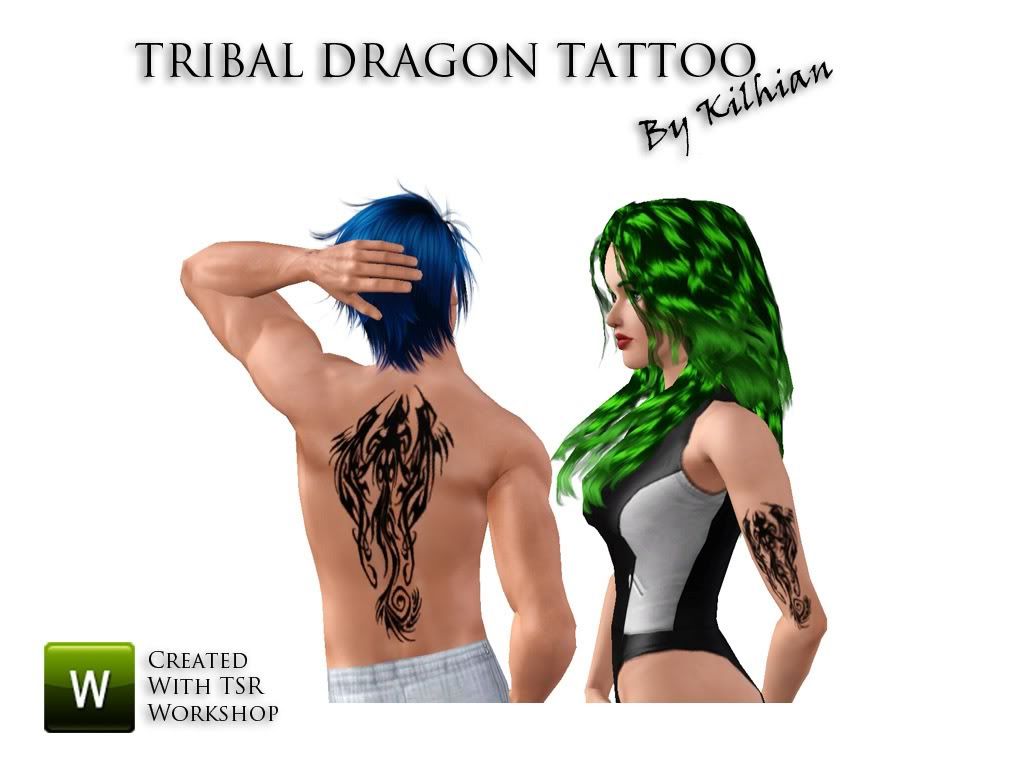
Tribal Dragon Tattoo
I have been so busy lately trying to improve that I felt the need to make something more simple. It still took me a while until I figured out what was wrong, and the next time I will try for a more complex tattoo. Still I really like how it turned out!
This is a one chanel tattoo with the tribal design of a dragon, available for both male and female.
Because the design is a bit complex, the normal size will be a bit blurry depending where you want to use it. Open the Advanced Mode and raise the scale (scale and opacity are on max on the preview picture).
This is a one chanel tattoo with the tribal design of a dragon, available for both male and female.
Because the design is a bit complex, the normal size will be a bit blurry depending where you want to use it. Open the Advanced Mode and raise the scale (scale and opacity are on max on the preview picture).
Subscribe to:
Posts (Atom)
How to install
Most of the time when possible I give you the possibility to install as either Sims3Pack or Package.
Pick up a format you rather use (poses can only be installed as Packages), and install it in your game:
If you use EA Launcher:
Sims3Packs
Place the .sims3pack file in your folder My Documents/Electronic Arts/The Sims 3/Downloads
Run the Launcher, click the Download panel on the left and select the files you want to install before pressing the Install button.
Note: You do not need to keep the file in this folder, it can be removed safely once installed and the Launcher/game is closed.
Packages
Place the .package file in your folder My Documents/Electronic Arts/The Sims 3/Mods/Packages
If you do not have or do not know how to set up the Mods folder, I wrote a tutorial here.
Note: If you have too many files in this folder you should consider merging them or it will make your game load and render slower. Aikea Guinea wrote a tutorial about it, see here.
If you use CC Magic:
This launcher manages both types, so you can place any .sims3pack and .package files you want in
My Documents/Electronic Arts/The Sims 3/Downloads
For those who don't know about it, you can find the installation here and a tutorial there.
Pick up a format you rather use (poses can only be installed as Packages), and install it in your game:
If you use EA Launcher:
Sims3Packs
Place the .sims3pack file in your folder My Documents/Electronic Arts/The Sims 3/Downloads
Run the Launcher, click the Download panel on the left and select the files you want to install before pressing the Install button.
Note: You do not need to keep the file in this folder, it can be removed safely once installed and the Launcher/game is closed.
Packages
Place the .package file in your folder My Documents/Electronic Arts/The Sims 3/Mods/Packages
If you do not have or do not know how to set up the Mods folder, I wrote a tutorial here.
Note: If you have too many files in this folder you should consider merging them or it will make your game load and render slower. Aikea Guinea wrote a tutorial about it, see here.
If you use CC Magic:
This launcher manages both types, so you can place any .sims3pack and .package files you want in
My Documents/Electronic Arts/The Sims 3/Downloads
For those who don't know about it, you can find the installation here and a tutorial there.
